






The browser wars are heating up again, but this time it’s different. While Google Chrome sits comfortably with 68.2% of the global market share, a new wave of AI browsers like Perplexity’s Comet and The Browser Company’s Dia are trying to challenge the status quo. Yet despite projections showing the AI browser market could explode from $4.5 billion in 2024 to $76.8 billion by 2034, these upstarts face a fundamental problem—they’re solving the wrong problem.
When someone opens a browser, they’re not primarily looking for a fancy way to get summarized text. They want to navigate the web, interact with websites, access services, shop, communicate, work, and live their digital lives. The current crop of AI browsers feels like putting a sports car engine in a bicycle—impressive technology that misses the point entirely.
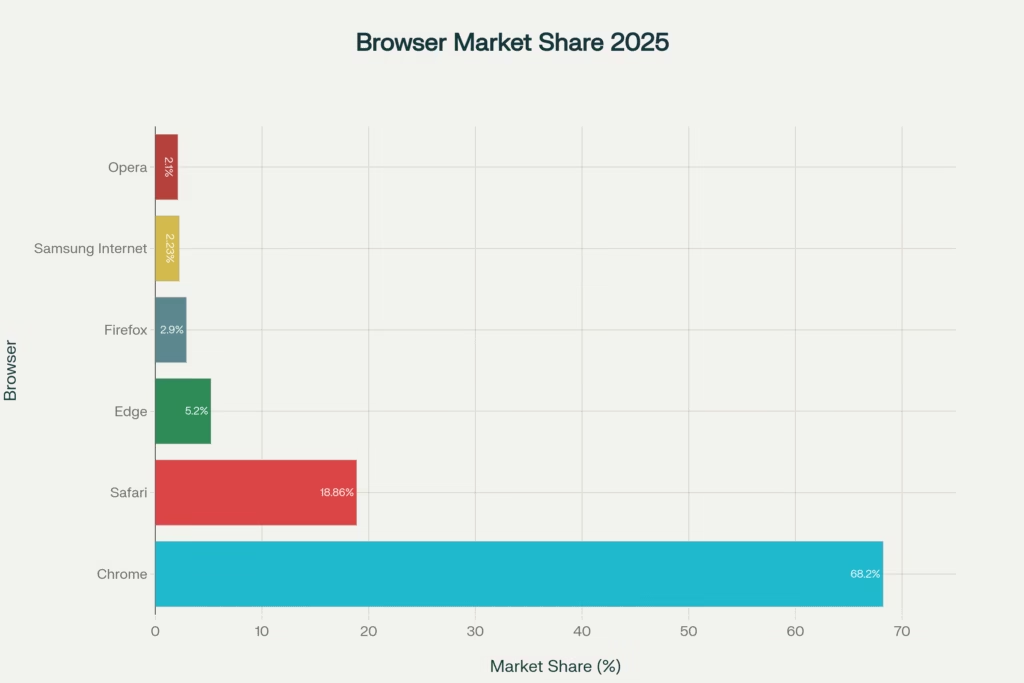
Browser Market Share 2025: Chrome’s Dominance in the Current Landscape
The Current AI Browsers Landscape: Innovation or Distraction?
Let’s look at what’s actually happening in the market. Perplexity’s Comet browser comes with a $200/month price tag (Or even $20 for Pro Users) and focuses primarily on AI-powered search through its sidebar assistant. The Browser Company’s Dia, priced at $20/month, puts an AI chatbot directly in the URL bar. Meanwhile, OpenAI is preparing to launch its own browser in the coming weeks, likely integrating its agent technology.
The problem? These browsers are treating AI as the main course when it should be the seasoning. They’re asking users to fundamentally change their browsing behavior for features that, frankly, Google already provides through Search and Gemini integration. Why would someone pay $200 monthly for AI-powered search when they can get similar capabilities for free?
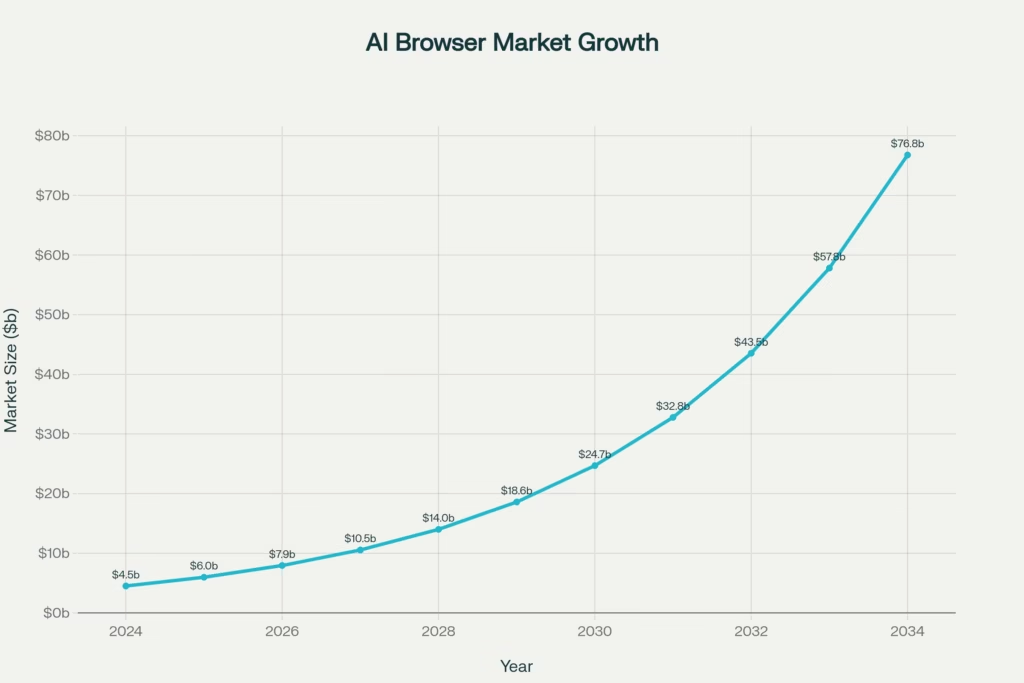
AI Browsers Market Growth: From $4.5B to $76.8B (2024-2034)
The Real AI Browsers Innovation Opportunity
Here’s what the AI browser pioneers are missing: true intelligence isn’t about giving you answers—it’s about anticipating your needs and removing friction from your workflows. The browser of the future shouldn’t make you think about AI; it should make you forget you’re even using a computer.
Contextual Workflow Intelligence
Imagine a browser that learns your work patterns and automatically prepares your environment. When you open your laptop at 9 AM on Monday, it doesn’t just restore your tabs—it intelligently organizes your workspace based on your calendar, recent projects, and behavioral patterns.
For instance, if you have a client presentation at 10 AM, the browser could:
- Pre-load and organize all related documents, emails, and research
- Suggest relevant recent conversations and updates
- Prepare backup materials and alternatives
- Set up the optimal window arrangement for your presentation setup
This isn’t about search—it’s about intelligent environment preparation.
Seamless Cross-Platform Continuity
The winning browser will excel at contextual handoffs between devices and applications. Start researching on your phone during your commute, and your desktop browser should seamlessly continue exactly where you left off—not just with open tabs, but with full context awareness of what you were trying to accomplish.
Current browsers treat each session as isolated events. The intelligent browser treats your entire digital workflow as a continuous story, maintaining context across:
- Time (sessions separated by hours or days)
- Devices (phone to laptop to tablet)
- Applications (email to documents to web research)
- People (collaborative work contexts)
Predictive Resource Management
Instead of making users manually manage bookmarks, tabs, and favorites, the intelligent browser should automatically surface relevant resources based on current context. Working on a quarterly report? The browser anticipates you’ll need last quarter’s data, relevant team conversations, and industry benchmarks—making them readily accessible without you having to remember or search for them.
What Revolutionary Features Could Actually Win?
Based on analyzing current user behavior patterns and technological capabilities, here are the features that, I believe, could actually revolutionize browsing:
1. Ambient Intelligence Layer
The browser continuously learns your work patterns and automatically optimizes your environment. It doesn’t wait for commands; it anticipates needs:
- Smart tab grouping and management based on project context
- Proactive resource suggestions before you realize you need them
- Intelligent notification filtering that understands priority and timing
- Automatic information synthesis across multiple sources and sessions
2. Universal Workflow Automation
Instead of just browsing websites, the browser becomes your digital workflow orchestrator:
- Cross-site task automation (like transferring data between applications)
- Intelligent form filling using contextual information
- Smart scheduling and calendar integration that understands your work patterns
- Automated follow-up reminders based on conversation context
3. Collaborative Intelligence
The browser understands you work with other people and facilitates seamless collaboration:
- Shared context awareness for team projects
- Intelligent meeting preparation with automatic briefing materials
- Real-time collaboration suggestions based on team activity
- Smart handoff capabilities when working across time zones
4. Adaptive Interface Evolution
Rather than a fixed interface, the browser evolves its layout and capabilities based on your current context:
- Work mode emphasizes productivity tools and focused layouts
- Research mode optimizes for information gathering and synthesis
- Communication mode prioritizes messaging and video tools
- Creative mode maximizes screen real estate and creative tools
The Integration Philosophy: Intelligence as Infrastructure
You’ve hit on something crucial: successful AI integration doesn’t challenge existing user experiences—it enhances them invisibly. The winning browser won’t ask users to learn new ways of working; it will make their existing workflows more efficient and effortless.
This means:
- No new interfaces to learn – intelligence works through familiar patterns
- No workflow disruption – AI enhances existing habits rather than replacing them
- No cognitive overhead – the system handles complexity behind the scenes
- No forced adoption – intelligence scales up as users become more comfortable
Why Current AI Browsers Are Struggling
The market data tells a clear story. Despite Chrome’s 68% market dominance being under regulatory scrutiny, AI browsers are failing to gain significant traction. Here’s why:
The Pricing Problem
Perplexity’s $200/month pricing (Or even $20 for Pro Users) for Comet creates an immediate barrier for mainstream adoption. Even Dia’s $20/month feels expensive for features that many users can access elsewhere for free.
The User Inertia Challenge
“Old habits die hard” in browser choice. Users are deeply comfortable with their current browsers, extensions, and workflows. Switching requires compelling value that goes far beyond AI chat features.
The Feature-Function Mismatch
Current AI browsers focus on search and summarization, functions that users can already access through existing tools. They’re not solving the real friction points in daily browsing and work.
The Historical Perspective: Learning from Previous Browser Wars
Looking at browser history provides crucial insights. Internet Explorer dominated with 95% market share by 1999 not because of superior technology, but because it was bundled with Windows. Chrome later won by being faster, more secure, and better integrated with Google’s expanding ecosystem.
The lesson? Distribution and integration matter more than isolated features. The winning AI browser won’t succeed because of AI capabilities alone—it will win by becoming indispensable to users’ daily workflows.
The Path Forward: Building the Intelligent Browser Ecosystem
The revolutionary browser won’t be built around AI—it will be built around human workflows, enhanced by AI intelligence. Here’s the blueprint how it can be done gradually:
Phase 1: Invisible Intelligence
Start by making existing browsing more efficient without changing user behavior. Smart tab management, predictive loading, and contextual suggestions that feel magical rather than intrusive.
Phase 2: Workflow Integration
Gradually introduce capabilities that connect browsing to broader work contexts. Calendar integration, project awareness, and collaborative features that make the browser feel like a team member rather than a tool.
Phase 3: Ecosystem Orchestration
Evolve into a platform that orchestrates your entire digital workflow across applications, devices, and contexts. The browser becomes your personal digital operating system.
The Bottom Line for AI Browsers
The next browser war won’t be won by the company with the best AI search or the smartest chatbot. It will be won by whoever creates a browsing experience so intelligently integrated into users’ lives that switching becomes unthinkable.
The winning browser will make you more productive, more efficient, and more capable, without making you think about AI at all. It will anticipate your needs, remove friction from your workflows, and seamlessly connect your digital life across contexts and devices.
That’s the browser worth building. That’s the browser worth switching to. And that’s the browser that could finally challenge Chrome’s dominance, not by being different, but by being indispensably better at what browsers are actually supposed to do: help you navigate and interact with the digital world as effortlessly as possible.
The future of browsing isn’t about AI-powered search. It’s about AI-powered living, where technology disappears into the background and just makes everything work better. The company that figures this out first will own the next decade of computing.
























Leave A Comment