
How I Built a 100 PageSpeed Portfolio with Astro, Keystatic, and Cloudflare Pages
On This Page
Executive Summary / TL;DR
An engineering playbook detailing Astro island architecture, Keystatic file‑CMS, and Cloudflare edge deployment to achieve a perfect 100/100 PageSpeed score.
Key Takeaways
- Leverage Astro’s island architecture to output zero‑JS HTML, cutting TBT below 50 ms.
- Exclude Keystatic from production builds via conditional import, removing 120 KB admin bundle.
- Deploy to Cloudflare Pages edge network for unlimited bandwidth and sub‑100 ms latency.
- Automate meta tag generation with Nvidia NIM LLM in GitHub Actions, eliminating manual SEO effort.
- Replace width‑based progress bar with CSS transform scaleX to maintain 60 FPS scrolling.
Building a personal portfolio website is a classic developer rite of passage. For the second iteration of my site, I wanted to move away from heavy frameworks and database-dependent platforms, aiming for a site that was fast, easy to write for, and cheap to host. I set a target: a perfect 100/100 score in all four categories (Performance, Accessibility, Best Practices, and SEO) on Google PageSpeed Insights.
This is the story of how I combined Astro, Keystatic, and Cloudflare Pages to build a content-managed portfolio, including how I integrated an LLM pipeline to handle the boring parts of SEO, and the exact performance audits that took the site to a perfect score.
The Architecture: Astro and Keystatic
The modern web development space is full of frameworks, but Astro stands out for static, content-heavy sites. Astro uses an island architecture, meaning it compiles pages to zero-JS static HTML by default. If you need interactive elements (like a contact form or tabbed interface), you can write them in React or Vue, and Astro only hydrates those specific components.
For content management, I did not want a database-driven headless CMS like Contentful or Sanity. Network calls to fetch data at build time add latency, and maintaining external accounts is tedious. Keystatic solved this. It is a local-first, file-based CMS that runs in your local development environment. When you save content in the Keystatic admin interface, it writes MDX and JSON files directly to your Git repository.
Production Build Optimization
One of Keystatic's best features is how easily it can be excluded from production builds. In astro.config.mjs, I configured Keystatic to load only when the environment is not production:
import { defineConfig } from 'astro/config';
import react from '@astrojs/react';
import mdx from '@astrojs/mdx';
import sitemap from '@astrojs/sitemap';
import tailwindcss from '@tailwindcss/vite';
import keystatic from '@keystatic/astro';

const isBuild = process.env.NODE_ENV === 'production';

export default defineConfig({
  site: 'https://www.rutvikbhatt.com',
  output: 'static',
  prefetch: {
    prefetchAll: true,
    defaultStrategy: 'hover',
  },
  build: {
    inlineStylesheets: 'always',
  },
  integrations: [
    react(),
    mdx(),
    sitemap(),
    ...(isBuild ? [] : [keystatic()]), // Exclude CMS from production builds
  ],
  vite: {
    plugins: [tailwindcss()],
    resolve: {
      dedupe: ['yjs', 'react', 'react-dom', '@keystar/ui', '@keystatic/core'],
    },
  },
});
By conditionally executing keystatic(), the production build remains completely clean, with no admin scripts, no UI bundles, and no unnecessary dependency weight.
Infrastructure: Why Cloudflare Pages?
For hosting, the primary choice was between Vercel and Cloudflare Pages. I decided to deploy on Cloudflare Pages.
There are several structural and financial reasons for this choice:
- Edge-First Architecture: Cloudflare's global edge network comprises over 250 data centers. Because my portfolio is built as a static site, Cloudflare caches assets directly at the edge, serving them with minimal latency.
- Free Serverless Functions at the Edge: For dynamic requirements (like contact form submissions and newsletter sign-ups), Cloudflare Pages provides Pages Functions. These functions run on V8 isolates rather than traditional serverless containers (like AWS Lambda). On the free tier, Cloudflare provides up to 100,000 free function requests per day with near-zero cold starts and rapid execution.
- Generous Build Limits and Bandwidth: Vercel sets strict bandwidth limits (100 GB per month) on its hobby tiers and charges high rates for overages. Cloudflare Pages offers unlimited bandwidth and up to 500 builds per month for free, meaning I do not have to worry about sudden traffic spikes or build frequency limits.
- No Seat-Based Pricing Pressures: Vercel charges on a per-member seat basis, which can become expensive for small team collaborations. Cloudflare offers unlimited seats on its free tier, making it ideal for self-managed developer projects.
- Adapter Compatibility: Astro provides a dedicated
@astrojs/cloudflareadapter, allowing page routing and static asset distribution to be configured automatically.
Automating SEO with Nvidia NIM and GitHub Actions
Writing metadata (meta titles, meta descriptions, FAQ questions, and keywords) for every single article is tedious. To solve this, I built an LLM-based content enrichment pipeline that runs automatically in GitHub Actions.
When I write a post in Keystatic and push it to the develop branch, the GitHub workflow executes a script that calls the Nvidia NIM API, uses an LLM to generate the missing metadata, parses the response, and writes the results back to the MDX files.
Here is the GitHub Action configuration (.github/workflows/build-content-and-deploy.yml):
name: Generate Content Assets and SEO

on:
  push:
    branches: [develop]
    paths:
      - 'src/content/**'

permissions:
  contents: write

jobs:
  process-content:
    name: Process Content Assets and SEO
    runs-on: ubuntu-latest
    steps:
      - name: Checkout repository
        uses: actions/checkout@v4
        with:
          token: ${{ secrets.GITHUB_TOKEN }}
          ref: ${{ github.ref_name }}

      - name: Set up Node.js
        uses: actions/setup-node@v4
        with:
          node-version: 22
          cache: 'npm'

      - name: Install dependencies
        run: npm ci

      - name: Generate Article Content
        run: node scripts/generate-article-content.mjs
        env:
          NVIDIA_API_KEY: ${{ secrets.NVIDIA_API_KEY }}
          LLM_MODEL: ${{ vars.LLM_MODEL || 'openai/gpt-oss-120b' }}

      - name: Generate Sitemaps
        run: node scripts/generate-sitemap.mjs

      - name: Clean Unused Assets
        run: node scripts/clean-unused-assets.mjs

      - name: Commit and push changes
        uses: stefanzweifel/git-auto-commit-action@v5
        with:
          commit_message: "chore: auto-generate content assets, clean unused images, SEO, and sitemaps [skip ci]"
The underlying script (scripts/generate-article-content.mjs) reads the frontmatter of each file. If it finds missing fields, it prompts the Nvidia NIM LLM gateway to fill them. Here is a simplified snippet showing the API call and the frontmatter writer:
async function callLLM(systemPrompt, userPrompt) {
  const apiKey = process.env.NVIDIA_API_KEY;
  if (!apiKey) return null;

  const res = await fetch('https://integrate.api.nvidia.com/v1/chat/completions', {
    method: 'POST',
    headers: {
      Authorization: `Bearer ${apiKey}`,
      'Content-Type': 'application/json',
      Accept: 'application/json',
    },
    body: JSON.stringify({
      model: process.env.LLM_MODEL || 'nvidia/nemotron-3-ultra-550b-a55b',
      messages: [
        { role: 'system', content: systemPrompt },
        { role: 'user', content: userPrompt },
      ],
      temperature: 0.3,
      max_tokens: 5000,
      stream: false,
    }),
  });

  if (!res.ok) throw new Error(`API error: ${res.status}`);
  const json = await res.json();
  return json.choices?.[0]?.message?.content?.trim() || null;
}
The LLM output is parsed as JSON, and the values are written back to the file using helper functions to upsert the YAML frontmatter. This automated commit mechanism keeps the content clean, and I never have to write a meta description again.
Keystatic Config and Reusable Schema
To support this structure, the Keystatic schema must align with the fields the LLM generates. In keystatic.config.ts, I defined a reusable seoFields block and integrated it into the collections:
import { config, fields, collection } from '@keystatic/core';

// Reusable SEO fields generated by our LLM pipeline
const seoFields = {
  metaTitle: fields.text({
    label: 'Meta Title',
    description: 'SEO title (50-60 chars). Auto-generated if empty.'
  }),
  metaDescription: fields.text({
    label: 'Meta Description',
    multiline: true,
    description: 'SEO description (150-160 chars). Auto-generated if empty.'
  }),
  keywords: fields.array(fields.text({ label: 'Keyword' }), {
    label: 'Keywords',
    itemLabel: (props) => props.value,
    description: 'SEO keywords. Auto-generated if empty.',
  }),
};

const faqFields = {
  faqQuestions: fields.array(
    fields.object({
      question: fields.text({ label: 'Question' }),
      answer: fields.text({ label: 'Answer', multiline: true }),
    }),
    {
      label: 'FAQ Questions (SEO/GEO)',
      itemLabel: (props) => props.fields.question.value || 'New Question',
      description: 'Auto-generated FAQ Q&A pairs for search engines.',
    }
  ),
};

export default config({
  storage: { kind: 'local' },
  collections: {
    blogs: collection({
      label: 'Insights',
      slugField: 'title',
      path: 'src/content/blogs/*',
      format: { contentField: 'content' },
      schema: {
        title: fields.slug({ name: { label: 'Title' } }),
        excerpt: fields.text({ label: 'Excerpt', multiline: true }),
        coverImage: fields.image({
          label: 'Cover Image',
          directory: 'src/assets/images/blogs',
          publicPath: '../../assets/images/blogs/',
        }),
        publishDate: fields.date({ label: 'Publish Date' }),
        category: fields.relationship({ label: 'Category', collection: 'categories' }),
        featured: fields.checkbox({ label: 'Featured', defaultValue: false }),
        draft: fields.checkbox({ label: 'Draft', defaultValue: false }),
        ...seoFields,
        ...faqFields,
        content: fields.mdx({ label: 'Content' }),
      },
    }),
  },
});
The Road to 100: Optimization Decisions
Getting a perfect PageSpeed score requires meticulous attention to details that are often ignored. When I first audited the site, it suffered from long blocking times, render-blocking scripts, layout reflows, and slow images. Here are the exact optimizations I implemented to fix these issues.
1. Deferring Third-Party Trackers (GA4 and Clarity)
Google Analytics 4 (GA4) and Microsoft Clarity are notorious performance killers. They block the main thread during the initial page load, which drives up Total Blocking Time (TBT) and delays the First Contentful Paint (FCP).
Instead of loading them synchronously, I wrote a deferred loading script in BaseLayout.astro. The script waits for the browser to become idle or triggers on the first physical user interaction (such as scrolling, clicking, keypress, or mouse movement):
<!-- Deferred Tracking (Google Analytics & Microsoft Clarity) -->
<script is:inline define:vars={{ gaId, clarityId }}>
  if (gaId || clarityId) {
    window.dataLayer = window.dataLayer || [];
    function gtag(){dataLayer.push(arguments);}
    window.gtag = gtag;

    let trackingInitialized = false;

    function initTracking() {
      if (trackingInitialized) return;
      trackingInitialized = true;

      cleanupListeners();

      // Load Google Analytics
      if (gaId) {
        const s = document.createElement('script');
        s.src = `https://www.googletagmanager.com/gtag/js?id=${gaId}`;
        s.async = true;
        s.setAttribute('data-cfasync', 'false'); // Avoid Rocket Loader interference
        document.head.appendChild(s);

        gtag('js', new Date());
        gtag('config', gaId, { page_path: window.location.pathname });
      }

      // Load Microsoft Clarity
      if (clarityId) {
        (function(c,l,a,r,i,t,y){
            c[a]=c[a]||function(){(c[a].q=c[a].q||[]).push(arguments)};
            t=l.createElement(r);t.async=1;t.src="https://www.clarity.ms/tag/"+i;
            t.setAttribute('data-cfasync', 'false'); // Avoid Rocket Loader interference
            y=l.getElementsByTagName(r)[0];
            y.parentNode.insertBefore(t,y);
        })(window, document, "clarity", "script", clarityId);
      }
    }

    const events = ['mousedown', 'keydown', 'touchstart', 'scroll', 'mousemove'];

    function setupListeners() {
      events.forEach(e => window.addEventListener(e, initTracking, { once: true, passive: true }));
    }

    function cleanupListeners() {
      events.forEach(e => window.removeEventListener(e, initTracking));
    }

    // Initialize if browser is idle, or wait for interaction
    if (window.requestIdleCallback) {
      window.requestIdleCallback(initTracking, { timeout: 4000 });
    } else {
      setupListeners();
    }
  }
</script>
This guarantees that the initial page paint completes without any external script interruptions.
2. Resolving the Cloudflare Rocket Loader Conflict
Cloudflare offers a feature called Rocket Loader to load script assets asynchronously. However, Rocket Loader rewrites <script type="module"> tags to a proprietary wrapper script (text/rocketscript).
This conflicts directly with Astro's prefetching system and ClientRouter library. When a user navigates between pages, Astro relies on dynamic ES Module imports. Rocket Loader interrupts this, resulting in the following console error:
Unhandled Promise Rejection: TypeError: Load failedIt also triggered warnings that preloaded assets were unused because the browser preloaded them as ES Modules, but Rocket Loader changed their execution type.
The Solution: I explicitly disabled Rocket Loader globally in the Cloudflare dashboard. Since we manually handle the deferral and asynchronous loading of tracking scripts anyway, Rocket Loader became redundant. Disabling it resolved all page-navigation console errors.
3. GPU-Accelerated CSS Animations (Reading Progress and Reveals)
Initially, the reading progress bar animated the CSS width property on scroll:
// Triggered on scroll - forces layout recalculation (reflow)
progressBar.style.width = `${progress}%`;
Modifying the width property forces the browser to recalculate the layout geometry of the page (reflow) on every single scroll frame. This causes high CPU usage and visible stuttering on low-end mobile devices.
I updated ReadingProgress.astro and the corresponding styles in global.css to use the CSS transform property with scaleX instead:
/* Optimized Reading Progress Bar CSS */
.reading-progress {
  position: fixed;
  top: 0;
  left: 0;
  width: 100%;
  height: 3px;
  background-color: var(--color-accent);
  z-index: 100;
  pointer-events: none;
  transform: scaleX(0);
  transform-origin: left;
  transition: transform 0.1s ease;
}
// Optimized JavaScript update - handled on GPU compositor thread
bar.style.transform = `scaleX(${Math.min(progress, 1)})`;Using transform: scaleX() avoids recalculating layout boundaries entirely. The browser shifts the work to the GPU compositor thread, keeping the scrolling frame rate at a stable 60 FPS.
I applied the same logic to the scroll-reveal animations. Instead of using Tailwind's default transition-all (which transition layout-heavy properties like shadows and borders), I defined a .reveal class that limits transitions exclusively to compositor-friendly properties:
.reveal {
  opacity: 0;
  transform: translateY(2rem);
  will-change: transform, opacity;
  transition: opacity 0.7s cubic-bezier(0.16, 1, 0.3, 1), transform 0.7s cubic-bezier(0.16, 1, 0.3, 1);
}

.is-revealed {
  opacity: 1 !important;
  transform: translateY(0) scale(1) !important;
}
4. Strategic Image Compression
Images are usually the largest payload items on a portfolio. Using Astro's built-in <Image> component, I optimized critical above-the-fold assets:
- The site logo in the header was compressed to WebP with
quality={65}, and configured withfetchpriority="high"andloading="eager"to speed up the Largest Contentful Paint. - The homepage and about page profile images were set to WebP format with
quality={75}.
The Results: Perfect 100s
After implementing these adjustments, the website achieved a clean, perfect 100 across Performance, Accessibility, Best Practices, and SEO on PageSpeed Insights:

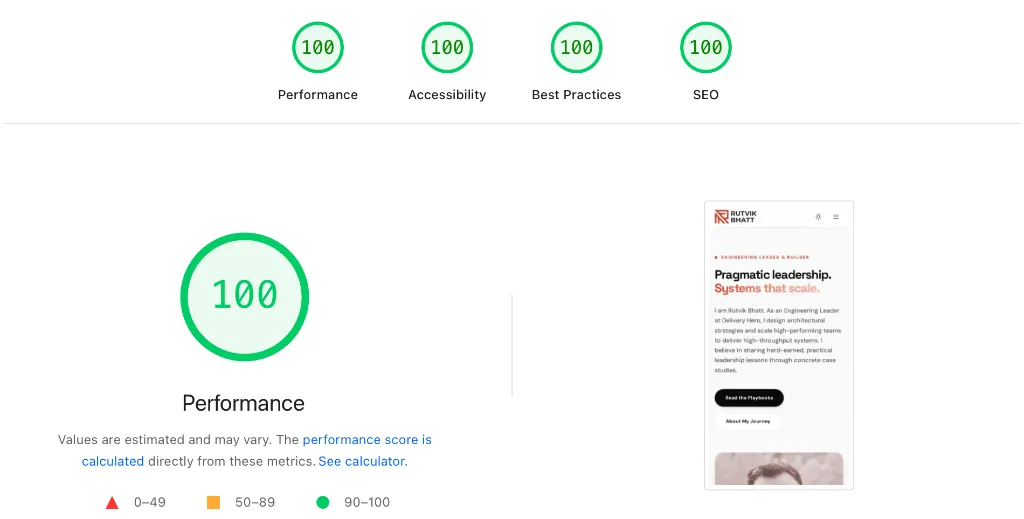
This architecture proves that you do not need to choose between dynamic content management and fast loading speeds. By combining a static site generator (Astro), a file-based CMS (Keystatic), edge deployment (Cloudflare Pages), and local automation pipelines, you can build a site that is fast, secure, and easy to maintain.
Liked this insight?
Share it with your colleagues and network.
Frequently Asked Questions
How does Astro achieve zero-JS static HTML?
Astro compiles pages to zero-JS static HTML by default, hydrating only needed islands. This island architecture isolates interactive components.
What is the advantage of Cloudflare Pages edge deployment?
Cloudflare Pages serves static assets from over 250 edge locations, reducing latency and providing unlimited bandwidth. Edge caching ensures near‑instant load times.
How does the Nvidia NIM LLM pipeline automate SEO metadata?
The Nvidia NIM LLM pipeline generates missing SEO metadata via API calls in GitHub Actions. It parses JSON responses and writes them back to MDX frontmatter.