
How I Built Unarchive.today: Running Local AI Models on Mobile to Solve My Reading Queue
On This Page
Executive Summary / TL;DR
An engineering playbook detailing how Unarchive.today combines React Native, Qwen 2.5 1.5B quantized LLM, and Distil‑Whisper to deliver offline‑first reading, on‑device summarization, and transcription on Android and iOS.
Key Takeaways
- Implement Android Auto-Return to save up to 20 tabs in 1.1 s without leaving the browser.
- Choose Qwen 2.5 1.5B Instruct 8‑bit for sub‑2 s summary latency and ~1.6 GB download size.
- Enable Quantized KV Cache to cut LLM RAM usage by ~50% and avoid OOM crashes.
- Inject stealth JavaScript and monitor Cloudflare titles to bypass Turnstile in WebViews.
- Apply a Happiness Funnel rating gate after 10 unarchives and 3 AI actions to protect App Store rating.
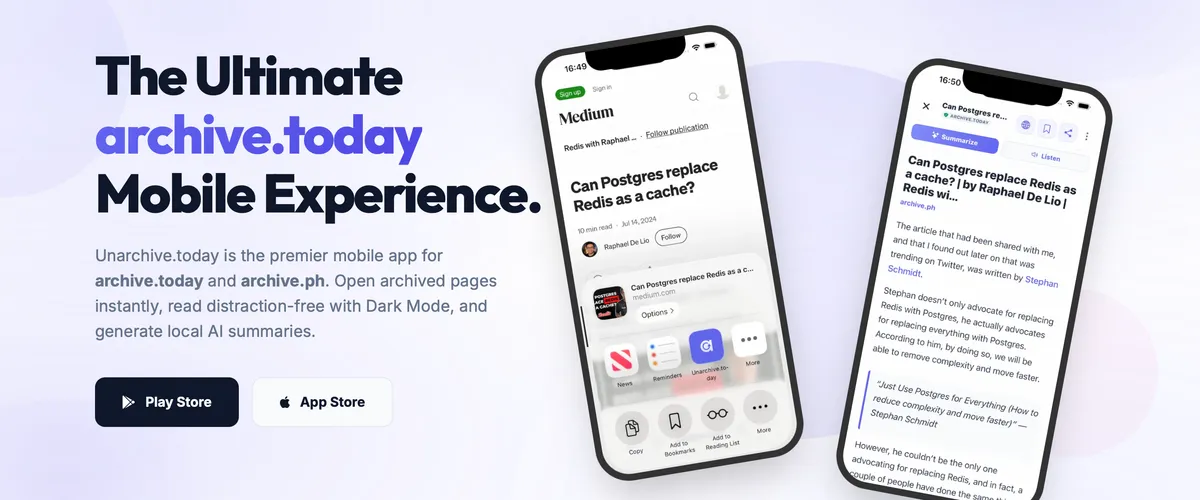
As a software engineer, I'm always looking for small projects to scratch my own itch. I wanted a way to save articles to archive.today and read or listen to them offline, without the clutter of web ads and paywalls. But using these archivers on mobile is a nightmare of copying, pasting, and squinting.
To solve this, I built Unarchive.today—an offline-first, native Read-It-Later application for Android and iOS using React Native and Expo.
What started as a simple wrapper for web archives turned into a fascinating experiment in running local AI models on mobile hardware. I wanted to see if I could build a private, zero-server-cost reading app using on-device Large Language Models (LLMs) for summaries and Whisper for transcription.
Here is the story of how I built it, the challenges I ran into, and the simple product design decisions that made it work.
The Inbox & Zero-Friction Capturing
A Read-It-Later app is only useful if it's effortless to save content. If saving a link requires switching apps, waiting for loads, and manually selecting folders, users will simply drop the habit.
I split the core capturing experience into three optimized flows:
1. The Interceptor Bottom Sheet
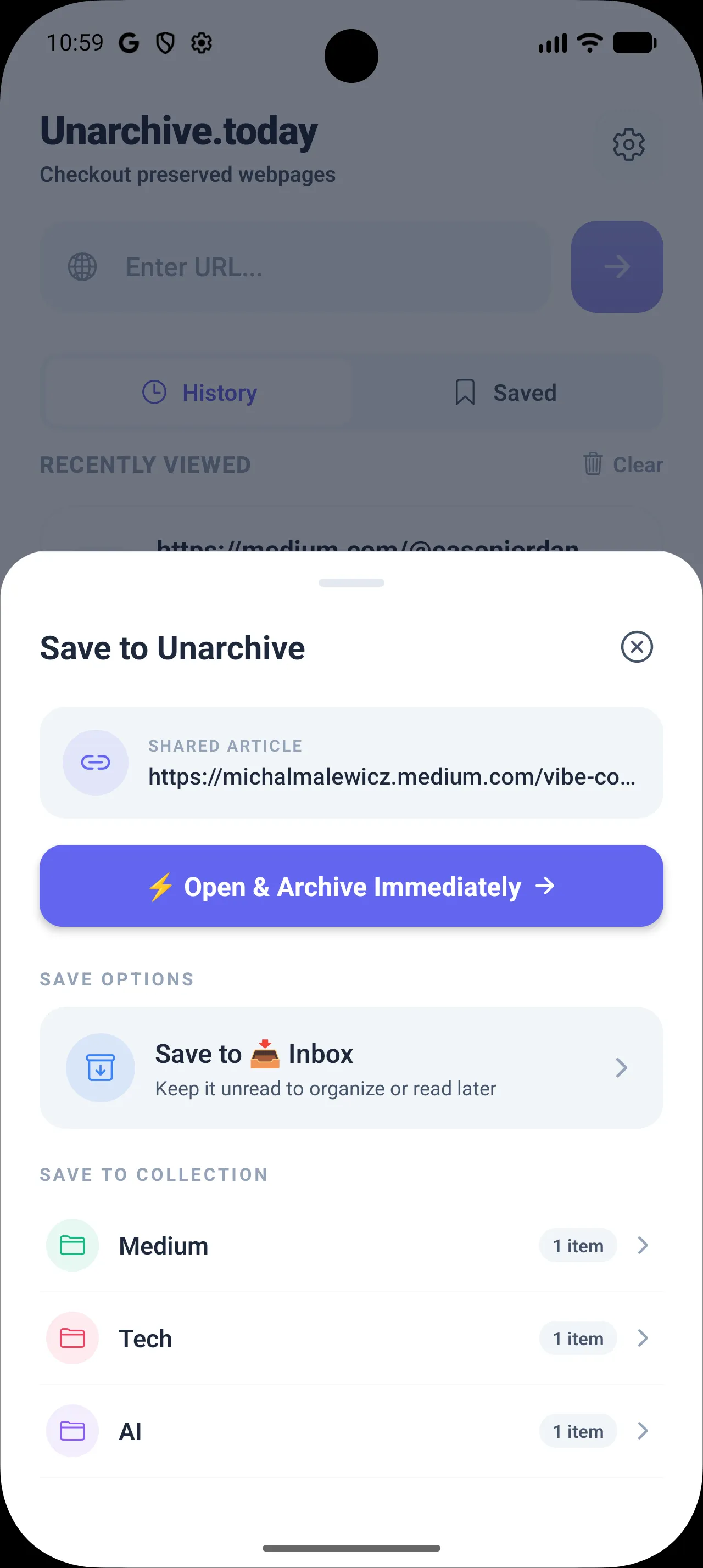
Instead of forcing the app to open when sharing a link, Unarchive.today registers as a native share target. Sharing an article from Safari, Chrome, or Twitter slides up a lightweight native bottom sheet. It provides three immediate actions:
- Save to Inbox: Instantly captures the bookmark as "unread" with a glowing pending badge.
- File into Folders: Creates or selects collections on-the-fly without pulling you out of your current app context.
- Open Immediately: Launches the full app and starts unarchiving.

2. Android Auto-Return
On iOS, the share sheet runs in a separate process overlay, returning you to your app when dismissed. Android, however, launches the target activity, leaving the user stranded inside the recipient app.
To create a zero-friction loop, I implemented Android Auto-Return. When a URL is shared from a mobile browser, Unarchive.today captures the intent, executes a background save operation, shows a success checkmark overlay, and triggers a system-level back-to-browser minimization exactly 1.1 seconds later.
"With Android Auto-Return, you can save 20 browser tabs in a row to your reading queue without ever leaving Chrome."
3. Native Reader Mode & OLED Dark Mode
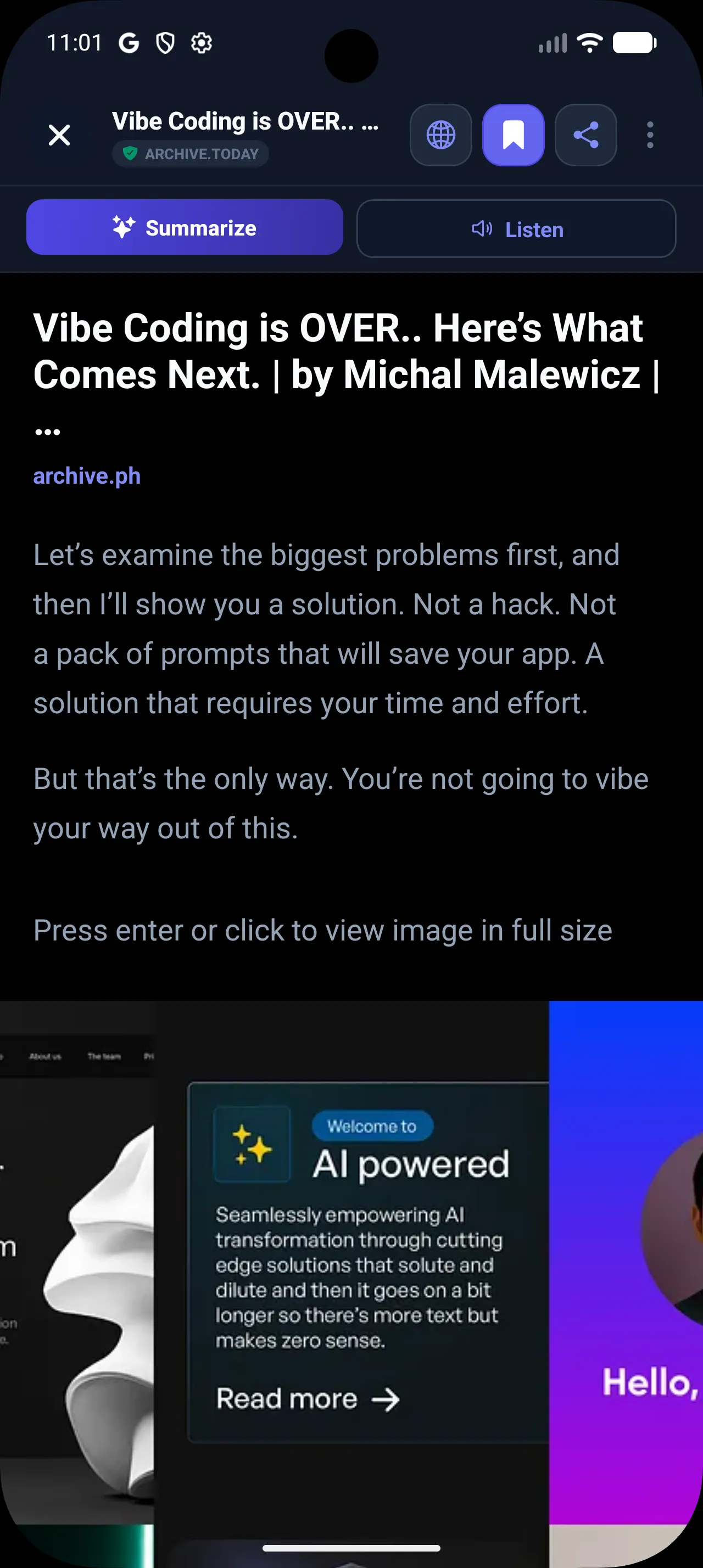
Once saved, reading the articles should feel just as premium. Instead of rendering slow, ad-ridden web pages, the app utilizes a custom native reader mode. This engine parses the archived HTML, strips away tracking cookies, dynamic ads, and cluttered layouts, formatting the article using premium typography and spacing optimized for long-form reading.
To make the reading experience comfortable and energy-efficient, we integrated a subtle theme engine supporting a pure black (#000000) Dark Mode. By using absolute black instead of default dark grays, we maximize contrast for long-form reading and significantly reduce battery consumption on OLED displays.
Building the On-Device AI Pipeline
Running AI models in the cloud for thousands of users is expensive and raises massive privacy concerns. Reading history is highly personal; sending every article text to an external API (like OpenAI) was a dealbreaker.
I committed to a strict constraint: All summarization and listening services must run 100% locally on the device.
1. The Model Selection Journey
I initially experimented with Gemma 2B using Google's MediaPipe LLM wrapper. While Gemma's reasoning was impressive, it proved too heavy for a side product:
- Download Friction: Over 1.8GB to download is a major barrier to user activation.
- Memory Footprint: Frequently exceeded 1.2GB RAM on initialization, triggering aggressive iOS Out-of-Memory (OOM) crashes.
- High Latency: Prefill times on mid-range Android processors averaged 12-15 seconds before the user saw the first token.
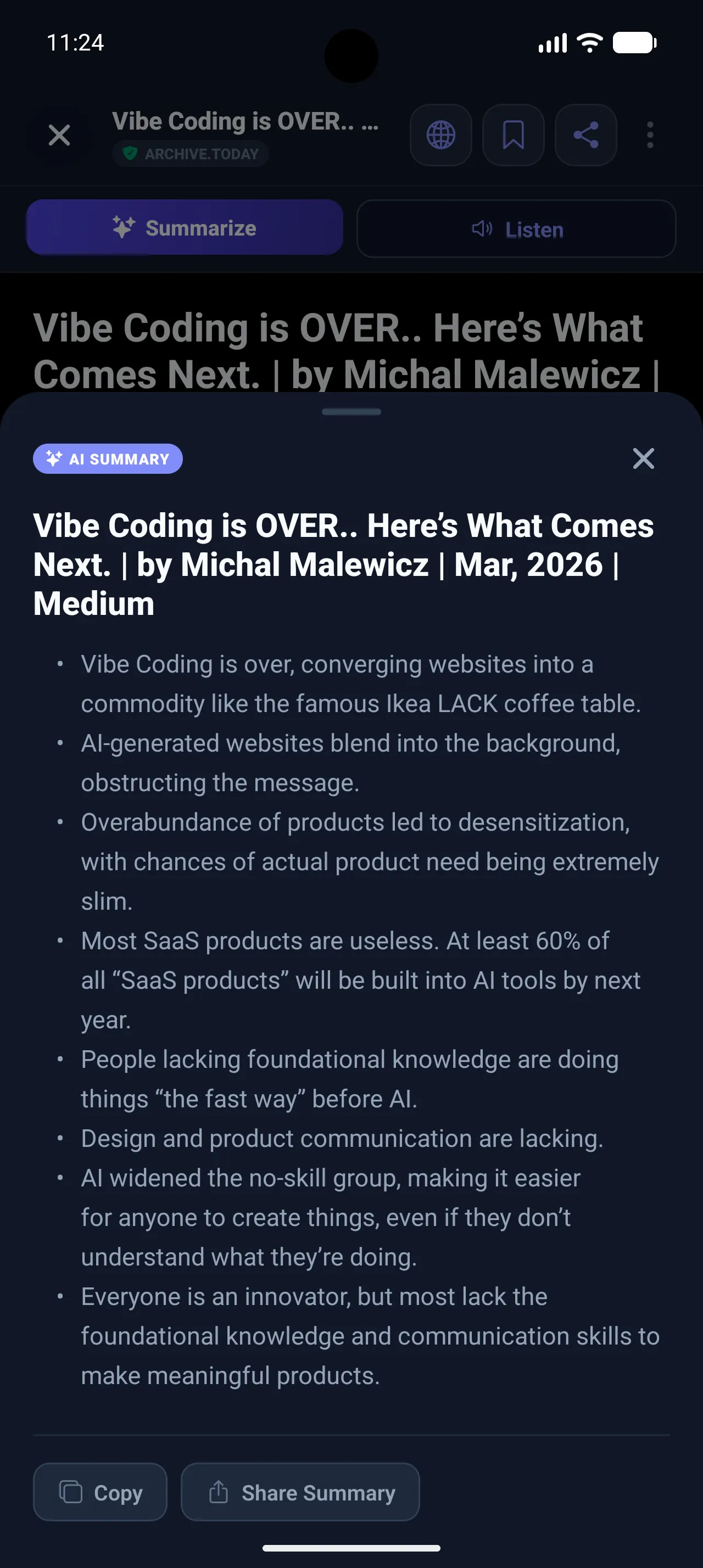
We pivoted the product strategy to use Qwen 2.5 1.5B Instruct (quantized to 8-bit). Qwen 2.5 is significantly faster, has a smaller download footprint (~1.6GB), and yields excellent bullet-point summaries.
For the Listening Mode (voice transcription), we integrated Distil-Whisper Small English (~123MB). Distil-Whisper provides a 6x speedup over the standard OpenAI Whisper base model while maintaining 98%+ transcription accuracy.
Optimizing AI for Lower-End Mobile Hardware
Making local AI work on a high-end flagship phone is simple. Making it work on a four-year-old budget phone without crashing the system requires defensive engineering.
Here are the four optimization systems built into the model management layer:
1. Hardware Gates
Before a user is allowed to download the models, the app runs a hardware diagnostics check. We inspect available RAM and disk storage. If the device has less than 3.5GB of total RAM, or less than 2GB of storage, we block the download and display a helpful warning.
static async checkDeviceCapability(): Promise<CapabilityCheck> {
    const totalMemory = Device.totalMemory; // in bytes
    if (totalMemory && totalMemory < 3.5 * 1024 * 1024 * 1024) {
        return { supported: false, reason: 'Insufficient RAM (Need 4GB+)' };
    }

    try {
        const freeDisk = await FileSystem.getFreeDiskStorageAsync();
        if (freeDisk < 2 * 1024 * 1024 * 1024) {
            return { supported: false, reason: 'Insufficient Storage (Need 2GB+)' };
        }
    } catch (e) {
        return { supported: false, reason: 'Failed to check storage' };
    }
    return { supported: true };
}
2. Network-Aware Resumable Download Manager
Downloading a 1.6GB file over a spotty mobile network will often fail. We wrapped the download utility in a connection listener:
- Downloads are strictly Wi-Fi only. If the user drops off Wi-Fi, the download automatically pauses.
- We persist resume data to local storage after every chunk.
- I implemented a watchdog timer. If the download progress stalls at 0% for more than 15 seconds, the watchdog interrupts the download, deletes the corrupt fragment, and triggers a clean retry.
3. Quantized KV Cache & Truncation Gates
When initializing the local LLM runner, I enabled the Quantized KV Cache parameter, which reduces runtime RAM usage by nearly 50%:
// Enable Quantized KV Cache to fit within mobile memory constraints
this.llmHandle = await LlmModule.createModel(
    cleanPath,
    1280, // Context window (max tokens matching model limits)
    40,   // Top K
    0.7,  // Temperature
    Math.floor(Math.random() * 1000),
    true  // Quantized KV Cache enabled
);
To prevent context window overflow (which triggers native C++ layer segfaults), I enforce aggressive input truncation. Article bodies are sliced to a maximum of 3,500 characters, keeping token counts safely inside physical limits.
4. Sentence Chunking for Android TTS
During Listening Mode, the app uses Text-to-Speech (TTS) to read articles aloud. iOS handles long texts natively. Android's text-to-speech engine, however, crashes with length errors when fed text longer than 4,000 characters.
To resolve this, I implemented an automated sentence chunker. The text is split dynamically along sentence boundaries (regex: /[^.!?]+[.!?]+|\s*[^.!?]+$/g) into buffers of less than 3,800 characters, which are then queued sequentially:
const sentences = text.match(/[^.!?]+[.!?]+|\s*[^.!?]+$/g) || [text];
let current = '';
for (const sentence of sentences) {
    if ((current + sentence).length > MAX_CHUNK) {
        if (current) chunks.push(current.trim());
        current = sentence;
    } else {
        current += sentence;
    }
}
if (current.trim()) chunks.push(current.trim());
Bypassing Cloudflare Turnstile in WebViews
archive.today is frequently targeted by DDoS attacks and scrapers. As a result, accessing the site frequently triggers Cloudflare's Turnstile or hCaptcha challenge screens. Inside a headless fetch or a raw WebView, these challenges fail silently, leaving the user with an infinite loading spinner.
To solve this, I designed a Dual-Mode WebView Bridge.
Step 1: Injecting Stealth Headers
To prevent Cloudflare from immediately flagging our WebView as an automated bot, I inject a stealth JS script immediately before the document content loads. This deletes the navigator.webdriver flag and mocks standard browser attributes:
const STEALTH_JS = `
  (function() {
    try {
        const newProto = navigator.__proto__;
        delete newProto.webdriver;
        navigator.__proto__ = newProto;
        Object.defineProperty(navigator, 'languages', { get: () => ['en-US', 'en'] });
    } catch(e) {}
  })();
  true;
`;
Additionally, I enabled persistent session cookies in the WebView properties, allowing validation tokens to survive app restarts:
<WebView
    ref={webViewRef}
    source={{ uri: archiveUrl }}
    userAgent={USER_AGENT}
    injectedJavaScriptBeforeContentLoaded={STEALTH_JS}
    sharedCookiesEnabled={true}
    thirdPartyCookiesEnabled={true}
    domStorageEnabled={true}
    // ...
/>
Step 2: Interactive Challenge Routing
If stealth headers are not enough and Cloudflare triggers a Turnstile page, the app must intercept it. I wrote a DOM crawler that runs continuously on page load:
// Inside WebView DOM context
function checkCloudflare() {
    const challengeTitles = [
        "Just a moment...", "Please Wait", "One more step",
        "Checking your browser", "DDoS protection", "Access denied"
    ];
    const title = document.title;
    const isChallengeTitle = challengeTitles.some(t => title.indexOf(t) !== -1);

    const isChallenge = isChallengeTitle ||
        !!document.querySelector("#challenge-running") ||
        !!document.querySelector("#challenge-form") ||
        !!document.querySelector("#turnstile-wrapper") ||
        document.body.innerText.includes("Please complete the security check");

    if (isChallenge) {
        window.ReactNativeWebView.postMessage(JSON.stringify({
            type: 'CLOUDFLARE_CHALLENGE'
        }));
    }
}
When a challenge is detected, the app intercepts the message, immediately hides the Reader View, and forces the WebView into full-screen interactive mode. We display a custom security banner prompting the user to solve the Cloudflare Turnstile check manually.
Once passed, the WebView automatically redirects to the real page, the state resets, and the app transitions the user back to the native Reader View.
What's Next: The Future Roadmap
What started as a simple tool to read archives has made me realize how much further an offline-first reader can go when it has on-device AI. Here are a few ideas I'm thinking of building next:
1. Commute Read & Listen Alerts
Reminding myself to read saved articles during my commute. If the app detects you are traveling or commuting, it could send a notification offering to read the article aloud or play the voice summary, turning transit time into catching-up time.
2. A Personal "Daily Catchup" Podcast
Instead of going through articles one by one, compile all saved links from the last 24 hours into a single daily audio briefing. Using local models to summarize and synthesize the text, it would feel like listening to a personalized 10-minute daily podcast of your reading queue.
3. Complete Memory Graph & Intelligent Content Map
Building a visual representation of all saved links directly on the device. The app would map articles as nodes and group them dynamically into categories (e.g., Tech, Leadership, Product Design), helping you see the connections in your personal knowledge vault.
4. Semantic Search & Ask-Me-Anything
Allowing users to ask questions or search through their saved library semantically. By running a lightweight vector embedding model locally, you could search for concepts instead of exact keywords—like asking, "What were the security recommendations in that database article I saved last week?"
Growth Hacks: The Happiness Funnel
Intrusive "Rate this App" popups are the fastest way to get uninstalled. They disrupt user flows and frequently result in negative reviews.
For Unarchive.today, I designed a Happiness Funnel in the feedback routing system:
- Usage Gating: The app will never ask for a rating until the user has successfully unarchived at least 10 articles (demonstrating utility) and used one of our premium local AI features (summarizing/listening) at least 3 times.
- Filter Screen: When the prompt triggers, we ask a simple question: "Enjoying Unarchive.today?"
- User selects LOVE IT: Tapping this routes them directly to the Google Play Store or App Store to leave a 5-star review.
- User selects Needs Work: Instead of opening the public app store, the button opens a pre-addressed support email directly to my inbox.
This routing protects public ratings, encourages constructive criticism in a private space, and drives positive App Store visibility.
Takeaways from Building a Side Project
When building a small side project to solve a personal pain point, constraints are your best friend:
- Offline-First solves the server bill: By keeping models local, the app doesn't cost anything to run. There are no API keys to pay for, which makes it a sustainable side project.
- Friction is the enemy of simple habits: Features like Android Auto-Return (minimizing the app automatically in 1.1 seconds after saving a shared link) mean I actually use the app because it doesn't interrupt my browsing.
- Keep bad reviews private: Using a simple rating gate routes satisfied users to the Play Store and redirects critical feedback to a private support email, protecting the app's rating.
Get Started
Try Unarchive.today on your device. Let me know what you think of the local AI inference speed!
- Download Unarchive.today on Android (Google Play Store)
- iOS: Coming soon!
Liked this insight?
Share it with your colleagues and network.
Frequently Asked Questions
How does Unarchive.today capture shared links without leaving the browser?
Android Auto-Return captures shared URLs and returns to the browser. It triggers a system‑level back navigation exactly 1.1 seconds later, keeping the user in the original app.
What on-device language model powers article summarization in Unarchive.today?
Qwen 2.5 1.5B Instruct quantized to 8‑bit provides on‑device summarization capability. The model fits within ~1.6 GB download size and runs under 1 GB RAM on mid‑range phones.
How does the app ensure AI models run on low‑end mobile hardware?
Quantized KV Cache reduces runtime RAM by 50% for LLMs. Combined with aggressive 3,500‑character input truncation it prevents out‑of‑memory crashes on 4‑year‑old devices.
How does the app bypass Cloudflare Turnstile challenges in WebViews?
Stealth JavaScript injection removes webdriver flag to avoid Cloudflare detection. If a Turnstile page appears, the app posts a message to switch to interactive mode and let the user solve the challenge manually.
What rating‑gate strategy does Unarchive.today use to protect its App Store rating?
Rating prompts are gated until ten unarchives and AI uses. Satisfied users are sent to the store, while dissatisfied ones receive a private support email, preserving public star ratings.